Application Management: App & Interconnection Management Platform
A web platform that allows App Providers to create applications, configure interconnections, and publish their services to the marketplace through a self-service workflow.

Overview
Role: UI/UX Designer
Team:
1 General Manager (Stakeholder)
1 Product Owner
1 QA Engineer
1 UI/UX Designer
1 Front-end Engineer
1 Back-end Engineer
Platform: Web application (Responsive)
My Contribution
In this project, I designed the UI/UX for the new application management platform based on requirements discussed with Product and Engineering.
Key contributions:
• Discussed workflow with Product to understand system requirements
• Designed layout for app management and interconnection setup
• Designed step-by-step flow for interconnection configuration
• Designed all screens for app configuration and management
• Designed UI states (empty, error, loading, validation)
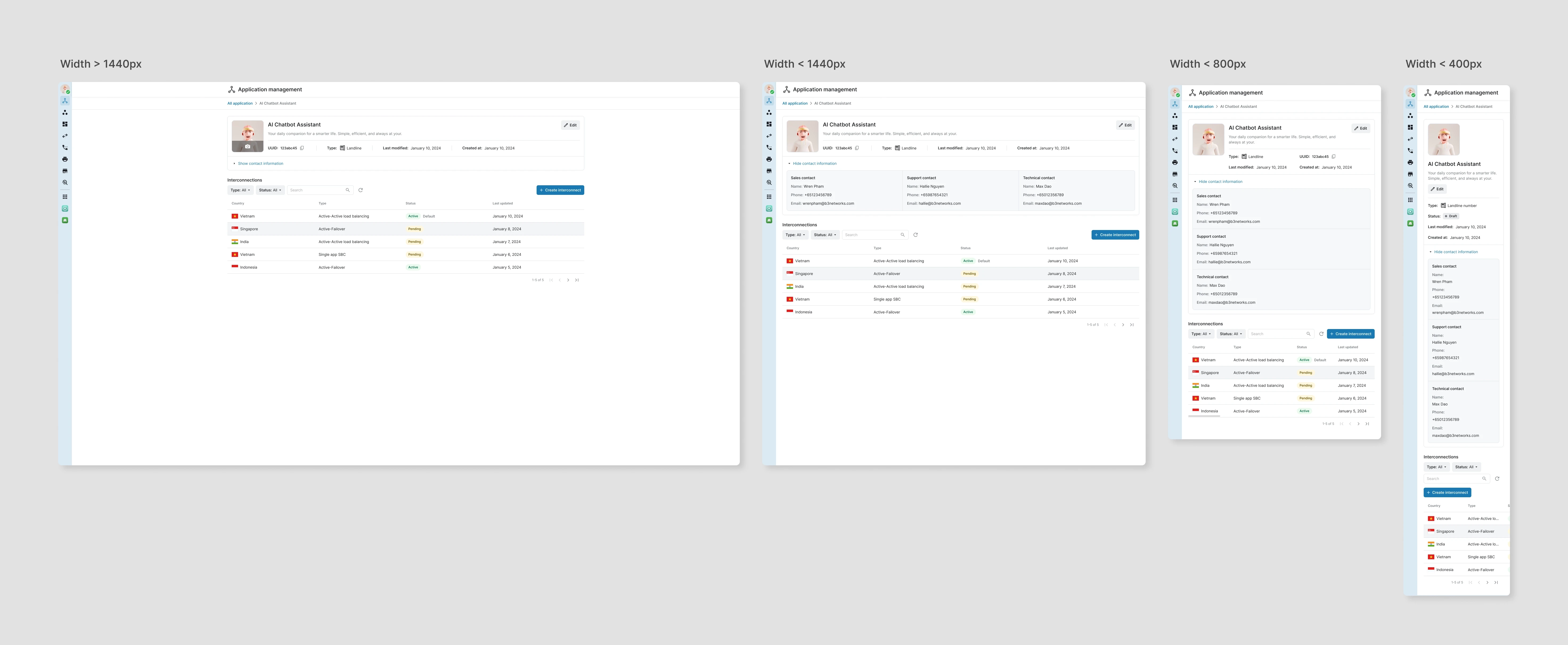
• Designed responsive layouts for different screen sizes
• Designed both light mode and dark mode
• Applied the company design system for UI consistency
• Supported engineers during implementation
• Reviewed UI before QA testing
Context & Problem
Before this platform was built, the interconnection setup process was handled manually by the internal team.
Partners had to send information through emails or tickets, and the internal team collected the data and configured the system manually.
This process took a long time and often required multiple confirmations.
Because many values were entered manually, mistakes could easily happen, especially when working with multiple partners and configurations.
To make the workflow faster and more scalable, a self-service platform was needed so partners could configure their apps and interconnections themselves, while the system keeps the process controlled.


Key issue:
• Configuration depended on manual data collection
• Setup process took too long
• Easy to make mistakes when entering data manually
• Hard to manage multiple apps and connections
• Too much effort from internal team
• Difficult to scale when number of partners increased
Design Solution
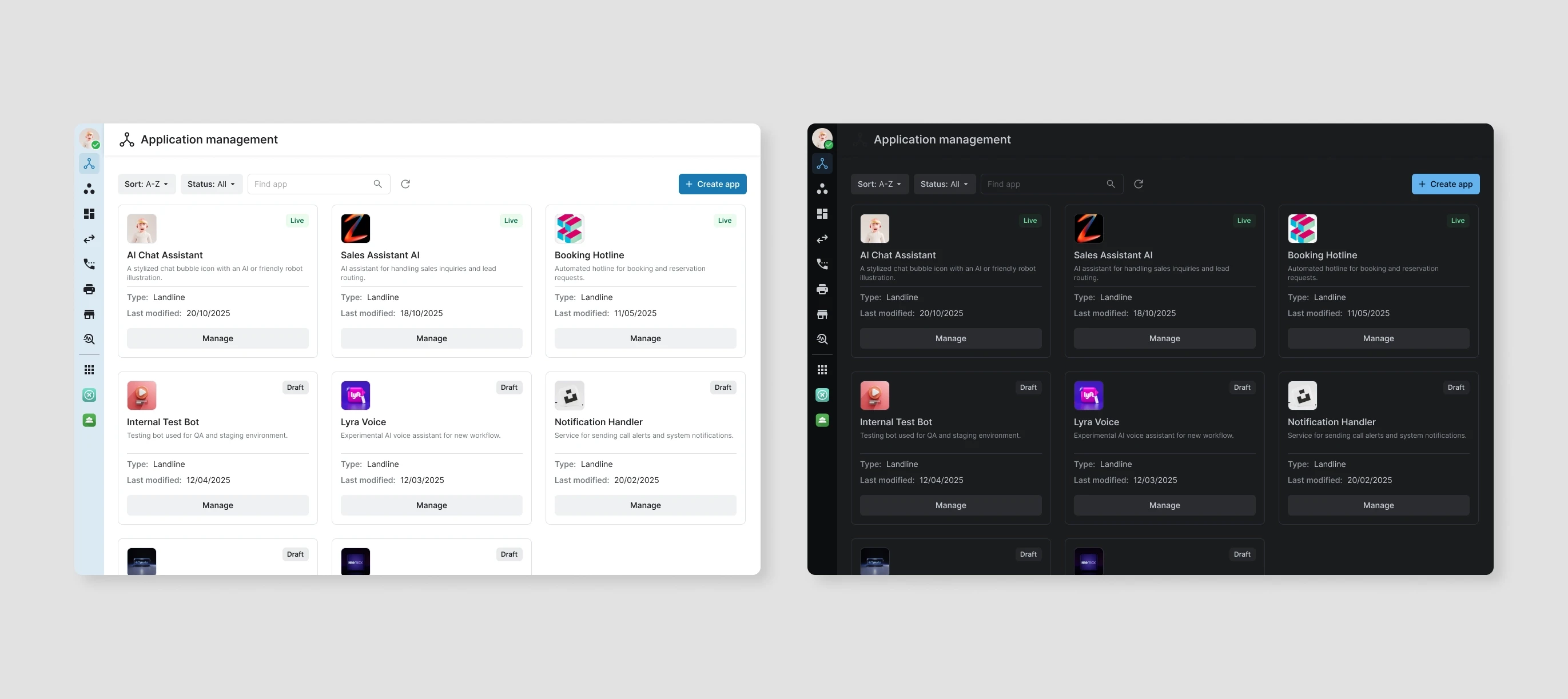
The new platform allows users to manage apps and interconnections in one place.
The workflow includes:
• App Management
• App Detail
• Interconnection Setup
• UI states (empty, error, loading, validation)
• Responsive layout and theme support
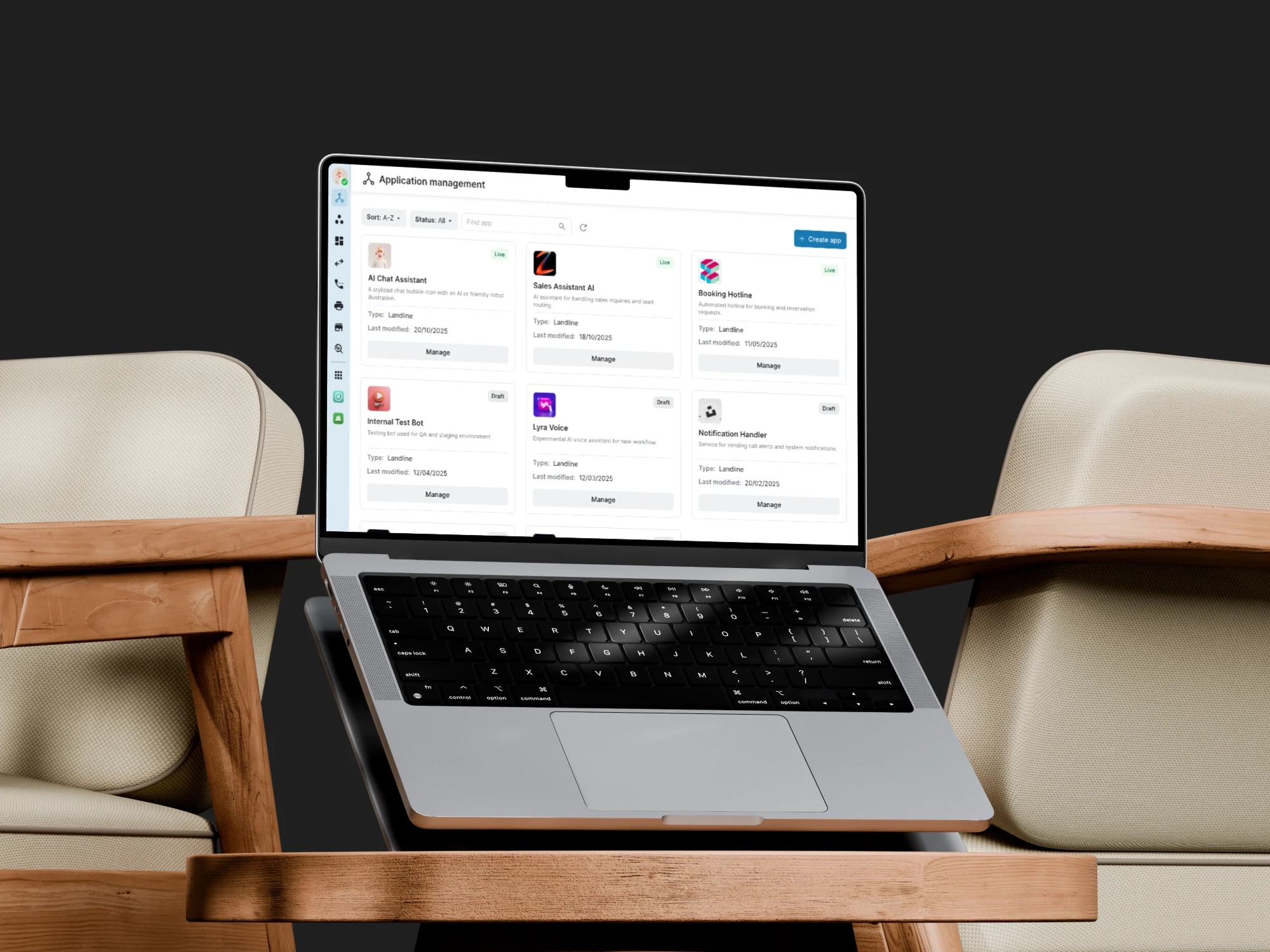
4.1 App Management
After opening an app, users can see detailed information and manage all interconnections inside the app.
The detail page shows app information together with the connection list so users can easily control the configuration in one place.
• View app information
• Update app details
• View interconnection list
• Create new interconnection
• Manage existing connections
This structure keeps all related settings inside the app instead of splitting them across multiple pages.
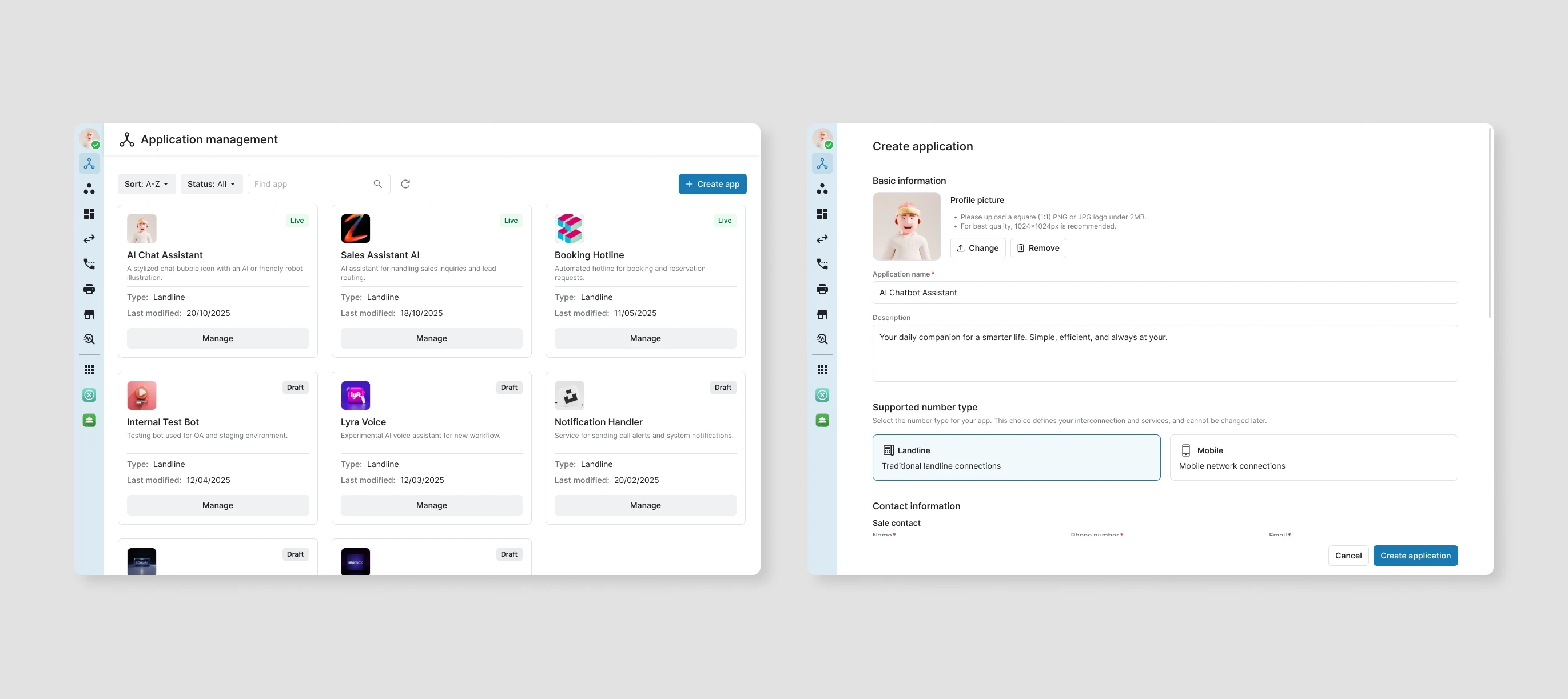
4.2 App Detail
Inside each app, users can view detailed information and manage its interconnections.
The detail page shows
• App information
• Contact information
• Interconnection list
Users can update information and create new interconnections from this page.

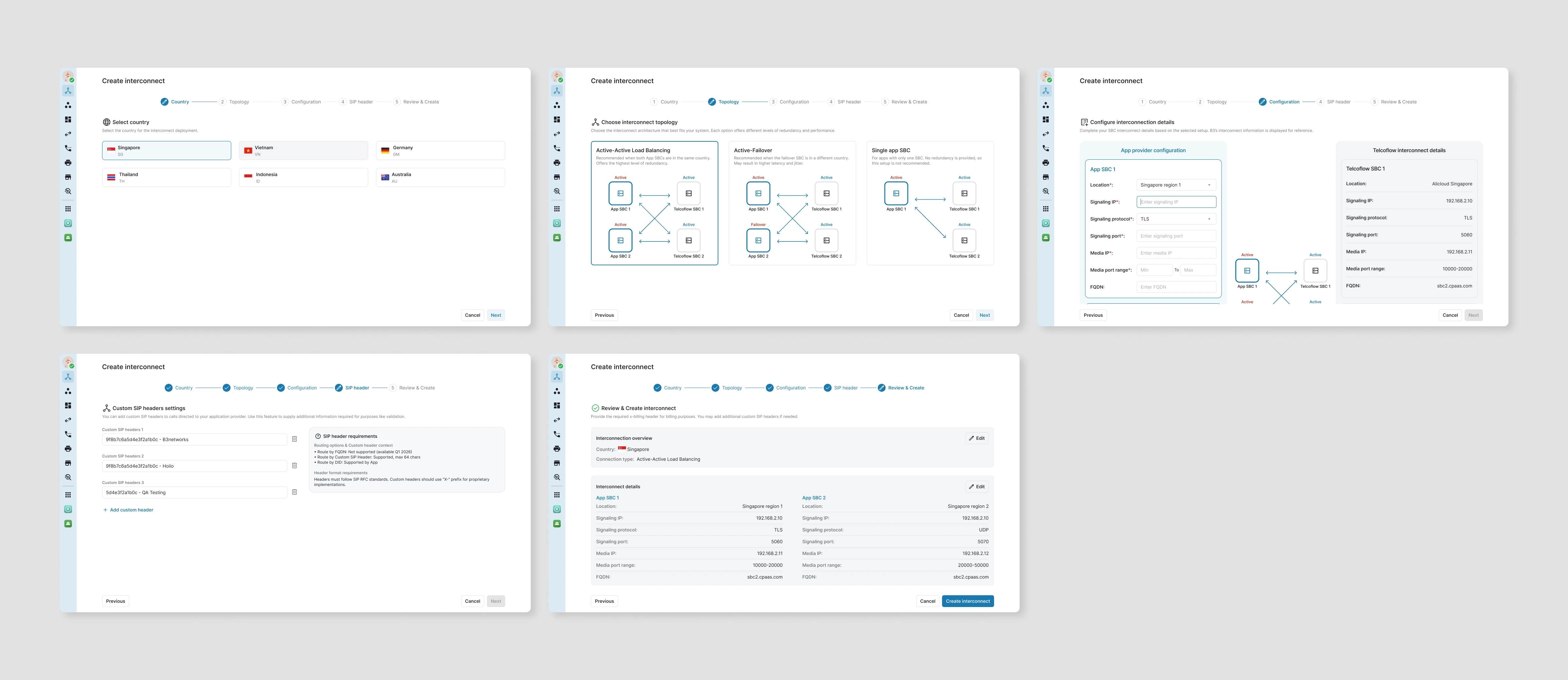
4.3 Interconnection Setup
To create a connection, a step-by-step flow was designed to make the configuration easier and reduce mistakes.
Instead of showing a long form, the system guides users through each step.
Steps include
• Select country
• Choose topology
• Configuration
• SIP header
• Review & create
Only required fields are shown in each step to keep the process simple and clear.
4.4 UI States
Different UI states were designed to support various scenarios during the configuration process.
• Empty state
• No result state
• Error / validation state
• Success state
These states help users understand the current status and continue the workflow without confusion.

4.5 Responsive & Theme
Different UI states were designed to support various scenarios during the configuration process.
• Empty state
• No result state
• Error / validation state
• Success state
These states help users understand the current status and continue the workflow without confusion.
User Feedback (After Launch)
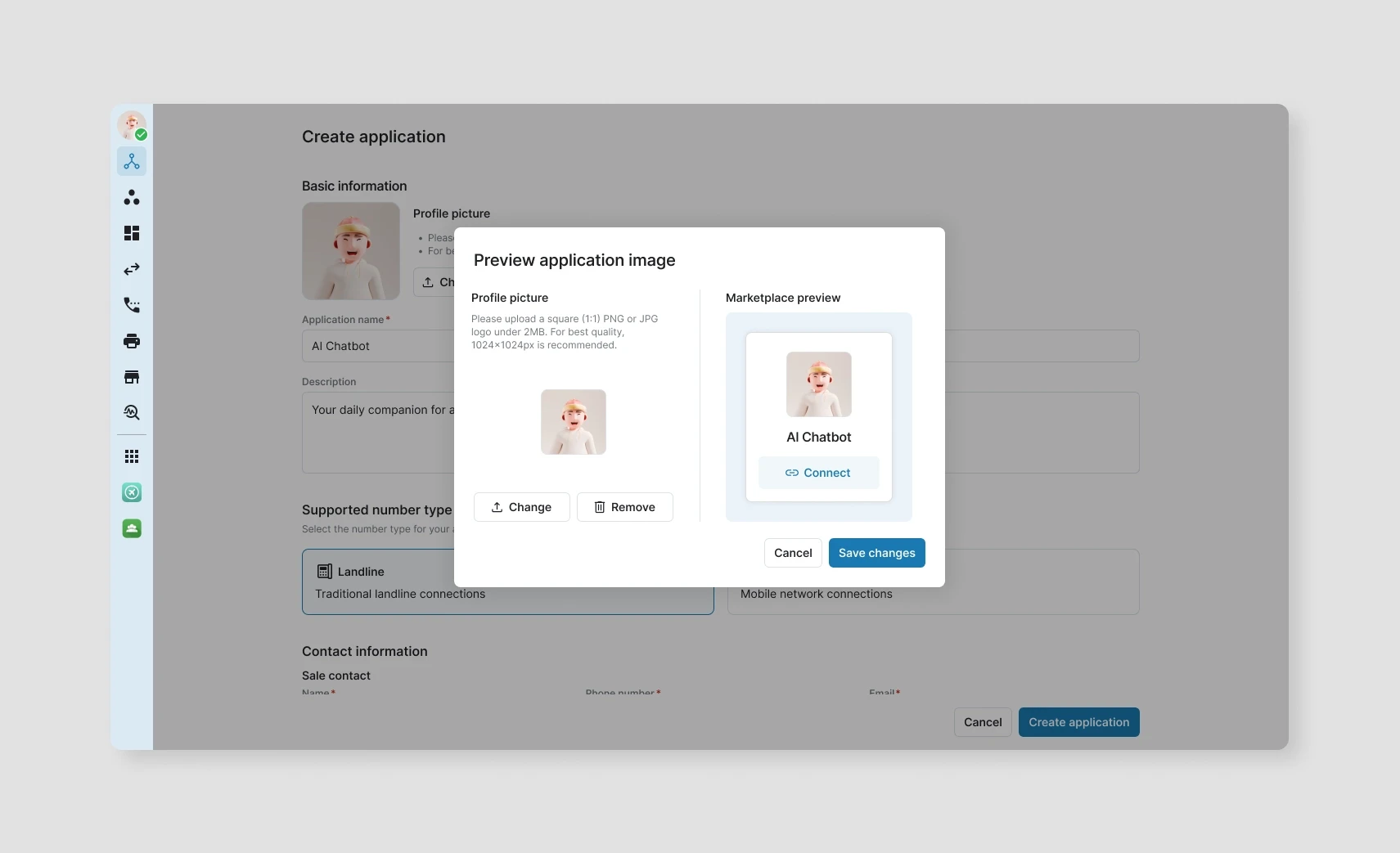
After the platform was used by partners, we collected feedback about the configuration workflow. One common request was the ability to preview how the app appears in the marketplace after uploading images and information.
Previously, users had to complete the setup first before knowing how the app would look, which made it hard to adjust logo size, text, or layout. To improve this, a preview screen was added so users can check the marketplace display before publishing.
Design Impact
Reduced manual setup
Reusable test cases reduced repeated documentation and simplified maintenance.
Faster configuration
QA engineers can create test runs by selecting components instead of assembling cases manually.
Fewer mistakes
Centralized dashboards allow QA leads to track testing progress more easily.
Better visibility
Structured workflows reduce errors caused by manual spreadsheet updates.
Safer submission
QA engineers spend less time managing files and more time focusing on testing quality.
Lower internal effort
QA engineers spend less time managing files and more time focusing on testing quality.
Collaboration & Design Handoff
During development, I worked closely with Product and Engineers to make sure the UI matched system logic.
• Discussed workflow and edge cases with Product
• Provided layout, components, and UI states in Figma
• Explained interaction and validation rules
• Supported engineers during implementation
• Reviewed UI before QA testing
• Fixed visual issues after integration
Design specs and updates were shared continuously to keep the implementation consistent with the design.

Application Management: App & Interconnection Management Platform
A web platform that allows App Providers to create applications, configure interconnections, and publish their services to the marketplace through a self-service workflow.
Overview
Role: UI/UX Designer
Team:
1 General Manager (Stakeholder)
1 Product Owner
1 QA Engineer
1 UI/UX Designer
1 Front-end Engineer
1 Back-end Engineer
Platform: Web application (Responsive)
My Contribution
In this project, I designed the UI/UX for the new application management platform based on requirements discussed with Product and Engineering.
Key contributions:
• Discussed workflow with Product to understand system requirements
• Designed layout for app management and interconnection setup
• Designed step-by-step flow for interconnection configuration
• Designed all screens for app configuration and management
• Designed UI states (empty, error, loading, validation)
• Designed responsive layouts for different screen sizes
• Designed both light mode and dark mode
• Applied the company design system for UI consistency
• Supported engineers during implementation
• Reviewed UI before QA testing
Context & Problem
Before this platform was built, the interconnection setup process was handled manually by the internal team.
Partners had to send information through emails or tickets, and the internal team collected the data and configured the system manually.
This process took a long time and often required multiple confirmations.
Because many values were entered manually, mistakes could easily happen, especially when working with multiple partners and configurations.
To make the workflow faster and more scalable, a self-service platform was needed so partners could configure their apps and interconnections themselves, while the system keeps the process controlled.
Key issue:
• Configuration depended on manual data collection
• Setup process took too long
• Easy to make mistakes when entering data manually
• Hard to manage multiple apps and connections
• Too much effort from internal team
• Difficult to scale when number of partners increased
Design Solution
The new platform allows users to manage apps and interconnections in one place.
The workflow includes:
• App Management
• App Detail
• Interconnection Setup
• UI states (empty, error, loading, validation)
• Responsive layout and theme support
4.1 App Management
After opening an app, users can see detailed information and manage all interconnections inside the app.
The detail page shows app information together with the connection list so users can easily control the configuration in one place.
• View app information
• Update app details
• View interconnection list
• Create new interconnection
• Manage existing connections
This structure keeps all related settings inside the app instead of splitting them across multiple pages.
4.2 App Detail
Inside each app, users can view detailed information and manage its interconnections.
The detail page shows
• App information
• Contact information
• Interconnection list
Users can update information and create new interconnections from this page.
4.3 Interconnection Setup
To create a connection, a step-by-step flow was designed to make the configuration easier and reduce mistakes.
Instead of showing a long form, the system guides users through each step.
Steps include
• Select country
• Choose topology
• Configuration
• SIP header
• Review & create
Only required fields are shown in each step to keep the process simple and clear.
4.4 UI States
Different UI states were designed to support various scenarios during the configuration process.
• Empty state
• No result state
• Error / validation state
• Success state
These states help users understand the current status and continue the workflow without confusion.
4.5 Responsive & Theme
Different UI states were designed to support various scenarios during the configuration process.
• Empty state
• No result state
• Error / validation state
• Success state
These states help users understand the current status and continue the workflow without confusion.
User Feedback (After Launch)
After the platform was used by partners, we collected feedback about the configuration workflow. One common request was the ability to preview how the app appears in the marketplace after uploading images and information.
Previously, users had to complete the setup first before knowing how the app would look, which made it hard to adjust logo size, text, or layout. To improve this, a preview screen was added so users can check the marketplace display before publishing.
Design Impact
Reduced manual setup
Reusable test cases reduced repeated documentation and simplified maintenance.
Faster configuration
QA engineers can create test runs by selecting components instead of assembling cases manually.
Fewer mistakes
Centralized dashboards allow QA leads to track testing progress more easily.
Better visibility
Structured workflows reduce errors caused by manual spreadsheet updates.
Safer submission
QA engineers spend less time managing files and more time focusing on testing quality.
Lower internal effort
QA engineers spend less time managing files and more time focusing on testing quality.
Collaboration & Design Handoff
During development, I worked closely with Product and Engineers to make sure the UI matched system logic.
• Discussed workflow and edge cases with Product
• Provided layout, components, and UI states in Figma
• Explained interaction and validation rules
• Supported engineers during implementation
• Reviewed UI before QA testing
• Fixed visual issues after integration
Design specs and updates were shared continuously to keep the implementation consistent with the design.
OTHERS
OTHERS
OTHERS
(02)