TestHub: QA Test Management Platform
A web platform that helps QA teams create, manage, and run test cases, while enabling managers to track testing progress, monitor pass/fail results, and see who is responsible for each test case.
Overview
Role: UI/UX Designer
Team:
1 General Manager (Stakeholder)
1 Product Owner (QA Lead)
1 UI/UX Designer
1 Front-end Engineer
1 Back-end Engineer
Platform: Web application (Responsive)
My Contribution
As the sole UI/UX Designer, I translated product ideas and requirements into clear workflows and interfaces for QA teams.
Key contributions:
• Conducted internal user interviews and researched similar tools to understand testing workflows
• Translated product ideas into workflows, wireframes, and high-fidelity UI
• Applied patterns from the company’s design system
• Defined flows for test case management and test runs
• Collaborated with the QA Lead to refine requirements
• Supported engineers during development and design handoff
• Reviewed UI implementation and identified issues before QA testing
Context & Problem
Before TestHub, QA teams managed test cases using self-created Excel templates stored across multiple folders.
As the number of test cases increased, QA engineers spent significant time searching, duplicating, and organizing files, which made the testing process inefficient.
What initially appeared to be a file management issue revealed a deeper workflow problem in testing management.


Example of the spreadsheet workflow used by Hoang Dang and Anh Pha (QA Engineer) before TestHub.
Key issue:
Test cases were frequently duplicated, difficult to reuse, and hard to find
Test execution tracking was manual and time-consuming
Data inconsistencies occurred due to manual editing
Teams lacked clear visibility into testing progress
Linking test cases with bugs and requirements was difficult
Design Solution
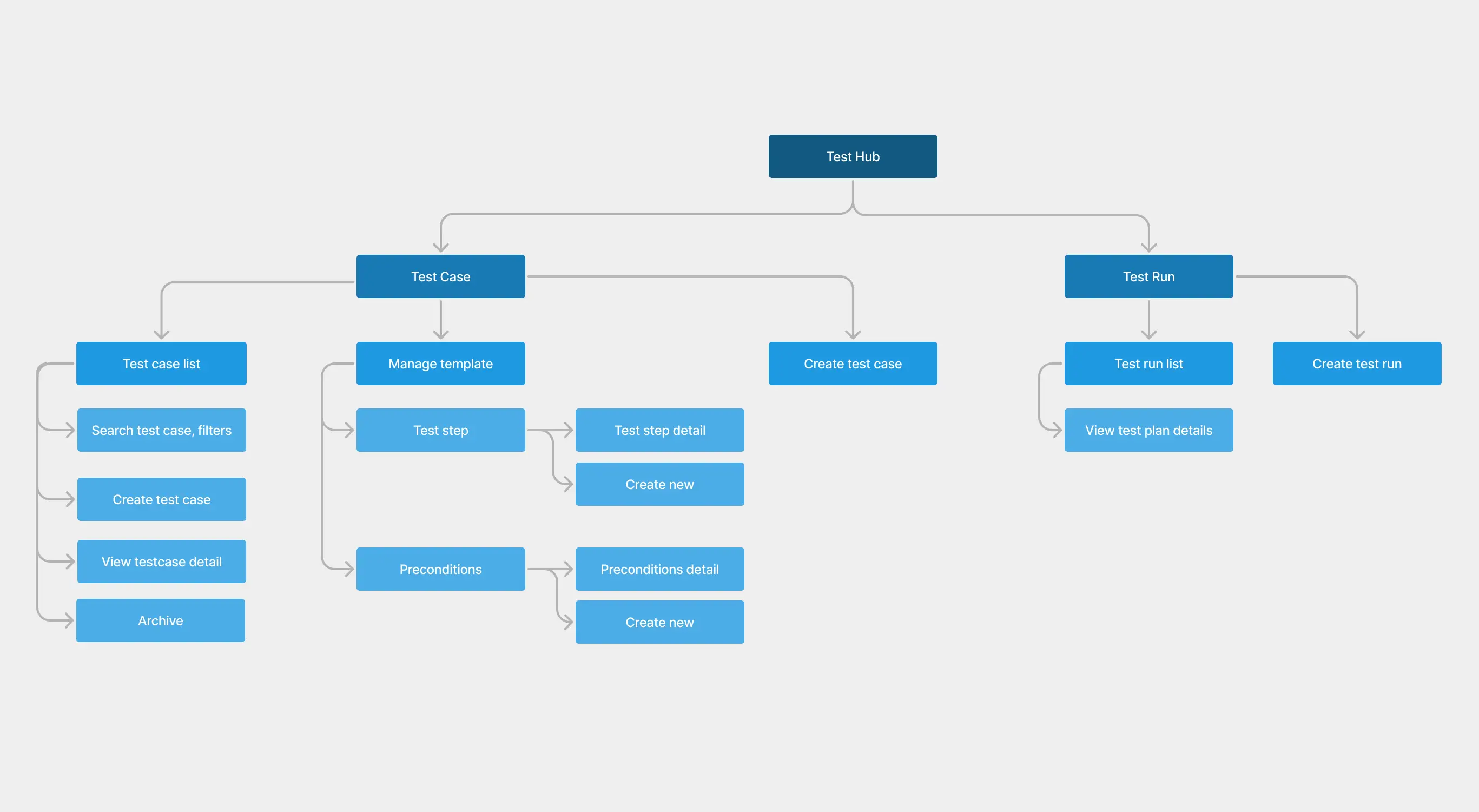
To solve the limitations of spreadsheet-based testing, TestHub was designed as a centralized testing platform for QA teams to create, organize, and execute test cases.
The platform is structured around two core modules:
• Test Case Management – create and manage reusable test cases
• Test Run Management – execute tests and track results
This structure separates test case management from test execution, allowing teams to reuse test cases across different testing cycles.
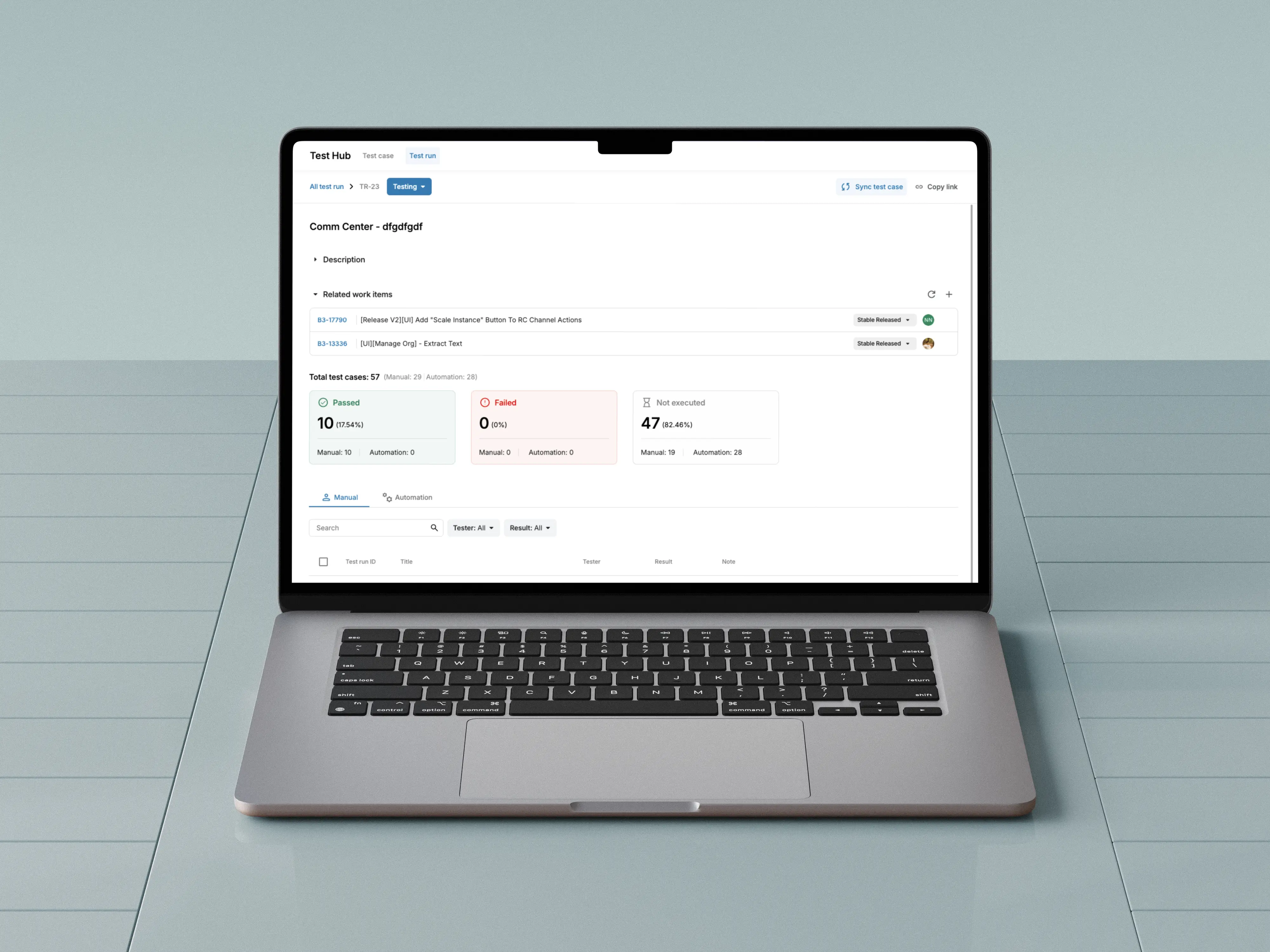
Within Test Runs, a status summary shows how many test cases are passed, failed, or not executed, helping QA engineers quickly track testing progress.

Test Case Management
In this tab, QA engineers create and manage reusable test cases. Each test case includes:
• Title and description
• Test type (manual or automated)
• Preconditions and test steps
Preconditions and test steps are structured as reusable components, helping teams maintain consistent testing structures and create test cases more efficiently. QA leads can also define templates for preconditions and steps, enabling faster and more standardized test case creation.
Test Run Management
Testing activities are managed in this section. QA engineers can quickly create a test run by selecting a component, which automatically includes all related test cases. They can then:
• Execute assigned test cases
• Run automated tests
• Update results (pass, fail, pending)
• Add notes or bug observations
• Link test cases to Jira tickets
Test cases can also be assigned to specific QA engineers, providing clear ownership during execution.
User Feedback (After Launch)
After TestHub was adopted internally, QA engineers shared feedback about how it improved their workflow.

Hoàng Đăng (QA Engineer)
“Previously, our testing process relied entirely on Google Sheets. As the number of test cases grew, managing hundreds of rows became cumbersome and error-prone.
With TestHub, everything is centralized. The Test Run structure helps organize related test cases clearly, and deployment status is visible directly in the app.”

Anh Pha (QA Engineer)
“Moving from fragmented spreadsheets to TestHub created a single source of truth for our QA process. Structured Test Runs and bug synchronization reduced manual work and made the testing workflow more transparent, helping our team move through testing cycles faster.”
Continuous Improvements
After launch, we collected feedback from QA teams and continued improving the product. Several enhancements were introduced, including bulk actions for updating multiple test results and Jira ticket integration to better connect testing and bug tracking workflows.

Design Impact
Reduced duplication
Reusable test cases reduced repeated documentation and simplified maintenance.
Faster test setup
QA engineers can create test runs by selecting components instead of assembling cases manually.
Improved testing visibility
Centralized dashboards allow QA leads to track testing progress more easily.
More reliable data
Structured workflows reduce errors caused by manual spreadsheet updates.
Better workflow efficiency
QA engineers spend less time managing files and more time focusing on testing quality.
Collaboration & Design Handoff
After handing off the design to engineers, I support the implementation by reviewing the UI before it moves to QA. I check spacing, layout alignment, and visual styles, and report any issues in a shared sheet so they can be fixed quickly. This helps ensure the final product is polished and consistent with the design.


Lesson Learned
Designing internal tools taught me that effective products are not defined by the number of features, but by how well they support real team workflows.
Launching a product is not the finish line. Continuous feedback and collaboration with QA, product, and front-end engineers help refine workflows and improve the system over time.
During the project, I also joined UI review sessions with engineers to check spacing, styles, and interactions before QA testing. Catching these issues early helped ensure a more polished final product.

(*A real moment during UI review 😄)
TestHub: QA Test Management Platform
A web platform that helps QA teams create, manage, and run test cases, while enabling managers to track testing progress, monitor pass/fail results, and see who is responsible for each test case.
Overview
Role: UI/UX Designer
Team:
1 General Manager (Stakeholder)
1 Product Owner (QA Lead)
1 UI/UX Designer
1 Front-end Engineer
1 Back-end Engineer
Platform: Web application (Responsive)
My Contribution
As the sole UI/UX Designer, I translated product ideas and requirements into clear workflows and interfaces for QA teams.
Key contributions:
• Conducted internal user interviews and researched similar tools to understand testing workflows
• Translated product ideas into workflows, wireframes, and high-fidelity UI
• Applied patterns from the company’s design system
• Defined flows for test case management and test runs
• Collaborated with the QA Lead to refine requirements
• Supported engineers during development and design handoff
• Reviewed UI implementation and identified issues before QA testing
Context & Problem
Before TestHub, QA teams managed test cases using self-created Excel templates stored across multiple folders.
As the number of test cases increased, QA engineers spent significant time searching, duplicating, and organizing files, which made the testing process inefficient.
What initially appeared to be a file management issue revealed a deeper workflow problem in testing management.
Example of the spreadsheet workflow used by Hoang Dang and Anh Pha (QA Engineer) before TestHub.
Key issue:
Test cases were frequently duplicated, difficult to reuse, and hard to find
Test execution tracking was manual and time-consuming
Data inconsistencies occurred due to manual editing
Teams lacked clear visibility into testing progress
Linking test cases with bugs and requirements was difficult
Design Solution
To solve the limitations of spreadsheet-based testing, TestHub was designed as a centralized testing platform for QA teams to create, organize, and execute test cases.
The platform is structured around two core modules:
• Test Case Management – create and manage reusable test cases
• Test Run Management – execute tests and track results
This structure separates test case management from test execution, allowing teams to reuse test cases across different testing cycles.
Within Test Runs, a status summary shows how many test cases are passed, failed, or not executed, helping QA engineers quickly track testing progress.
Test Case Management
In this tab, QA engineers create and manage reusable test cases. Each test case includes:
• Title and description
• Test type (manual or automated)
• Preconditions and test steps
Preconditions and test steps are structured as reusable components, helping teams maintain consistent testing structures and create test cases more efficiently. QA leads can also define templates for preconditions and steps, enabling faster and more standardized test case creation.
Test Run Management
Testing activities are managed in this section. QA engineers can quickly create a test run by selecting a component, which automatically includes all related test cases. They can then:
• Execute assigned test cases
• Run automated tests
• Update results (pass, fail, pending)
• Add notes or bug observations
• Link test cases to Jira tickets
Test cases can also be assigned to specific QA engineers, providing clear ownership during execution.
User Feedback (After Launch)
After TestHub was adopted internally, QA engineers shared feedback about how it improved their workflow.
Hoàng Đăng (QA Engineer)
“Previously, our testing process relied entirely on Google Sheets. As the number of test cases grew, managing hundreds of rows became cumbersome and error-prone.
With TestHub, everything is centralized. The Test Run structure helps organize related test cases clearly, and deployment status is visible directly in the app.”
Anh Pha (QA Engineer)
“Moving from fragmented spreadsheets to TestHub created a single source of truth for our QA process. Structured Test Runs and bug synchronization reduced manual work and made the testing workflow more transparent, helping our team move through testing cycles faster.”
Continuous Improvements
After launch, we collected feedback from QA teams and continued improving the product. Several enhancements were introduced, including bulk actions for updating multiple test results and Jira ticket integration to better connect testing and bug tracking workflows.
Design Impact
Reduced duplication
Reusable test cases reduced repeated documentation and simplified maintenance.
Faster test setup
QA engineers can create test runs by selecting components instead of assembling cases manually.
Improved testing visibility
Centralized dashboards allow QA leads to track testing progress more easily.
More reliable data
Structured workflows reduce errors caused by manual spreadsheet updates.
Better workflow efficiency
QA engineers spend less time managing files and more time focusing on testing quality.
Collaboration & Design Handoff
After handing off the design to engineers, I support the implementation by reviewing the UI before it moves to QA. I check spacing, layout alignment, and visual styles, and report any issues in a shared sheet so they can be fixed quickly. This helps ensure the final product is polished and consistent with the design.
Lesson Learned
Designing internal tools taught me that effective products are not defined by the number of features, but by how well they support real team workflows.
Launching a product is not the finish line. Continuous feedback and collaboration with QA, product, and front-end engineers help refine workflows and improve the system over time.
During the project, I also joined UI review sessions with engineers to check spacing, styles, and interactions before QA testing. Catching these issues early helped ensure a more polished final product.
(*A real moment during UI review 😄)
OTHERS
OTHERS
OTHERS
(02)